
VRV-Streaming Website UX/UI Design
VRV-Streaming Website UX/UI Design
VRV-Streaming Website UX/UI Design
Redesigning how user find and save their favorite shows across different platforms.
Redesigning how user find and save their favorite shows across different platforms.
Redesigning how user find and save their favorite shows across different platforms.
Theme
Theme
Design System, UX &
UI Design, Responsive
Web Design
Design System, UX &
UI Design, Responsive
Web Design
Team
Team
UX researcher, Project
manager, UX Designer
(Myself)
UX researcher, Project
manager, UX Designer
(Myself)
Process
Process
Double Diamond &
Design Thinking
Process
Double Diamond &
Design Thinking
Process
Tools
Tools
Figma, Zeplin,
Zoom
Figma, Zeplin,
Zoom
Timeline
Timeline
Seven
weeks
Seven
weeks
Theme
Design System, UX &
UI Design, Responsive
Web Design
Team
UX researcher, Project
manager, UX Designer
(Myself)
Process
Double Diamond &
Design Thinking
Process
Tools
Figma, Zeplin,
Zoom
Timeline
Seven
weeks

VRV - Streaming website with anime channel subscriptions
Brief
VRV is an over-the-top streaming service launched in November 2016. Some of VRV's content can be streamed for free, while other content requires a subscription. The subscriptions to its channels can be purchased individually, or in a premium bundle.
VRV is currently available only in the United States, despite some of its partnered content being available for viewing worldwide outside the platform. In 2020, I joined 6 other UX Designers, to redesign the current VRV platform to improve usability and discoverability of content as well as increasing and retaining the number of paid subscribers.
How might we increase the number of subscribed users by improving content discoverability and layout consistency without content overload?
Challenge
User Interviews : Qualitative Research
16 people of different age group were interviewed to understand their behavioural pattern while using VRV vs. other platforms paid subscribers.
Research
My Research Encompassed
How often they are using these streaming services?
Their motivations behind using certain platform?
What challenges did they face while completing certain tasks?
How do they complete assigned task on VRV?
User Insights
None of the users like to use mobile web due to inconsistent and irresponsive design.
Almost every user preferred search bars to find shows due quick and easy access.
Current catagorical structure in VRV didn’t seem to help any user in providing what they were looking for.
Information architecture and navigation seem redundant in VRV as most users were stuck
while completing the assigned task.
Surveys : Quantitative Research
Only 2 out of 51 users, involved in quantitative research, were using and familiar with VRV. But more than half of the users were watching anime on regular basis using other streaming services.
Red Routes - Prioritising user needs
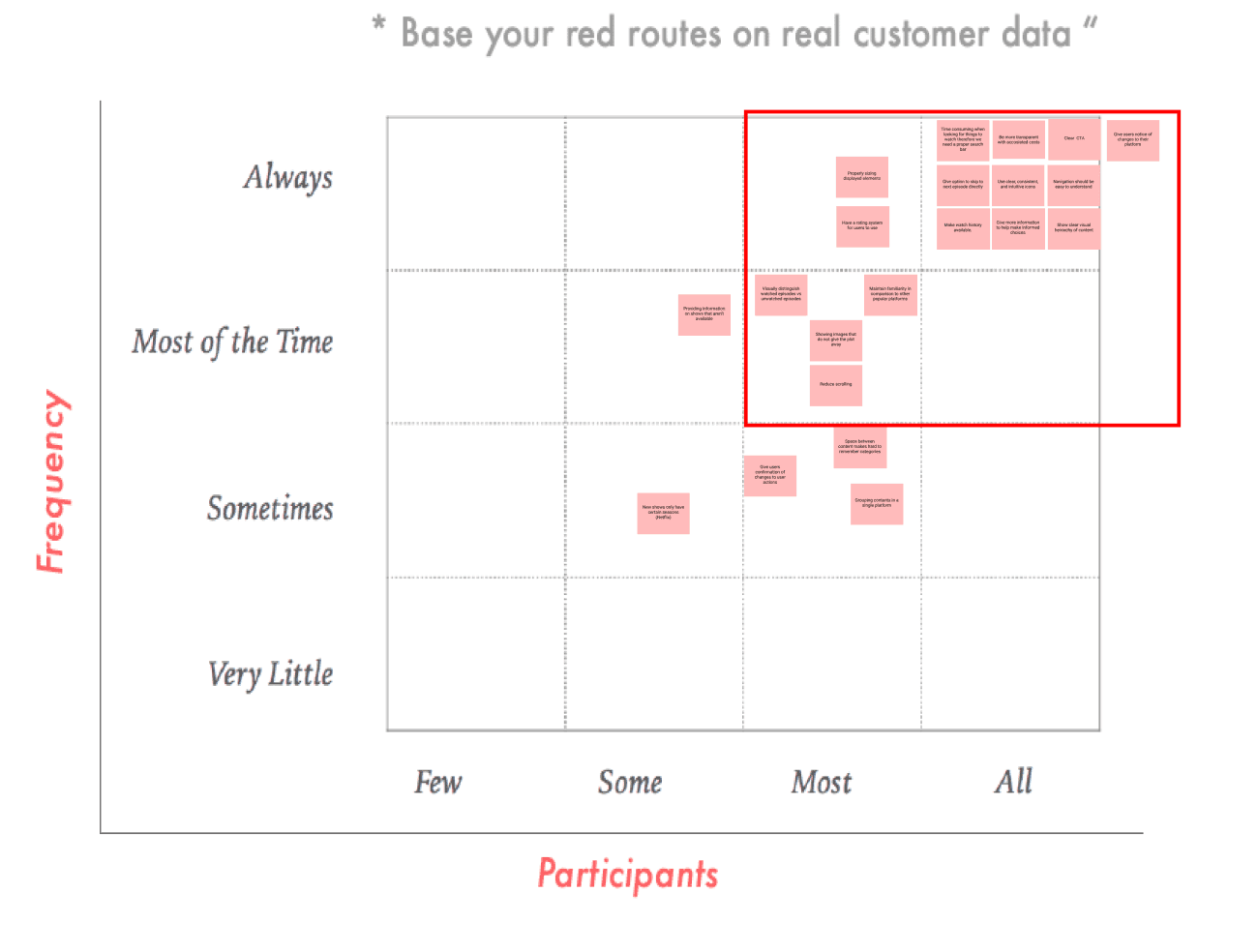
We narrowed down our focus on solving the problems which were causing hindrance in fulfilling their primary needs. We categorized their needs accordingly based on how often and how many users they faced.
Competitive analysis to explore already available solutions
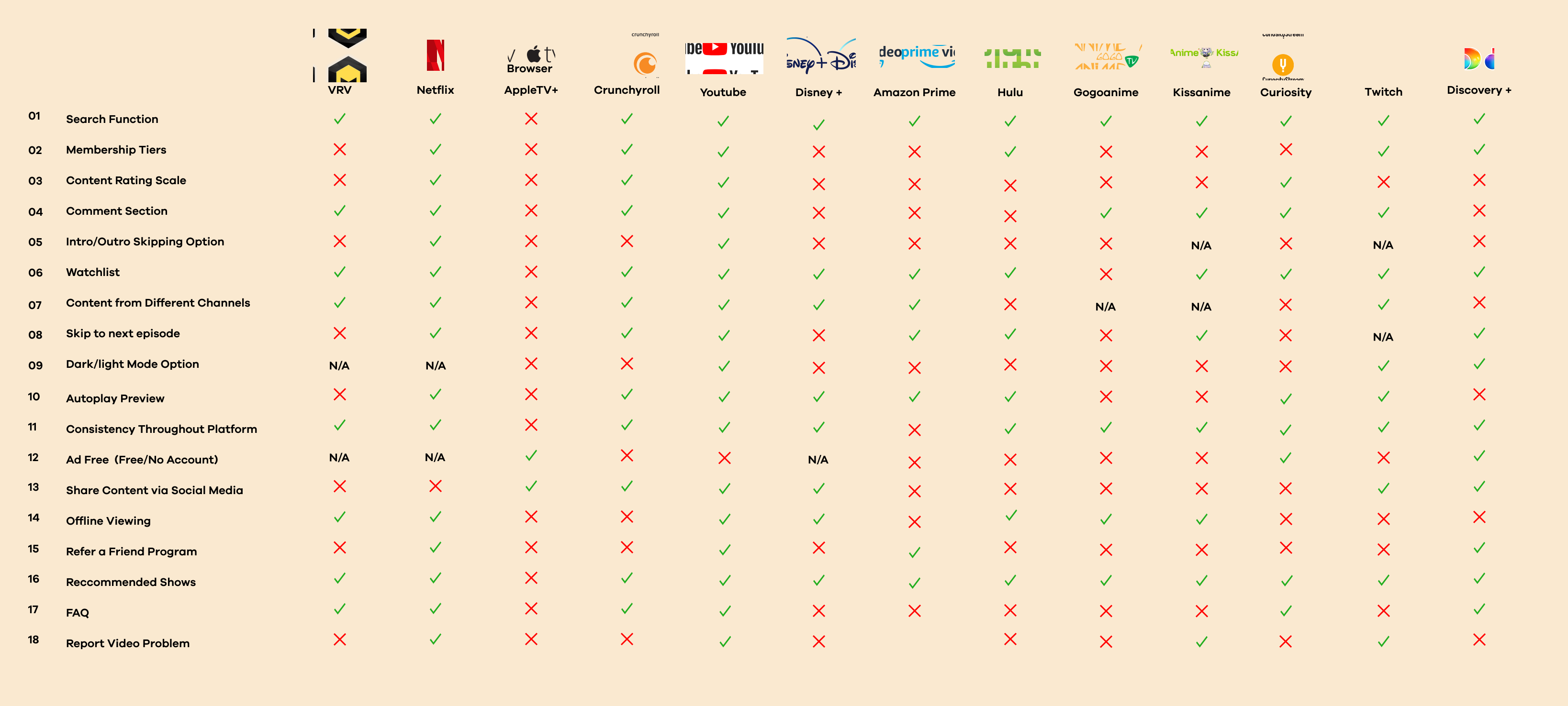
12 direct and indirect competitors were analyzed to understand how they were approaching their users needs and where they were lacking. This helped us narrowed down our focus to ideas that potentially seem more promising.
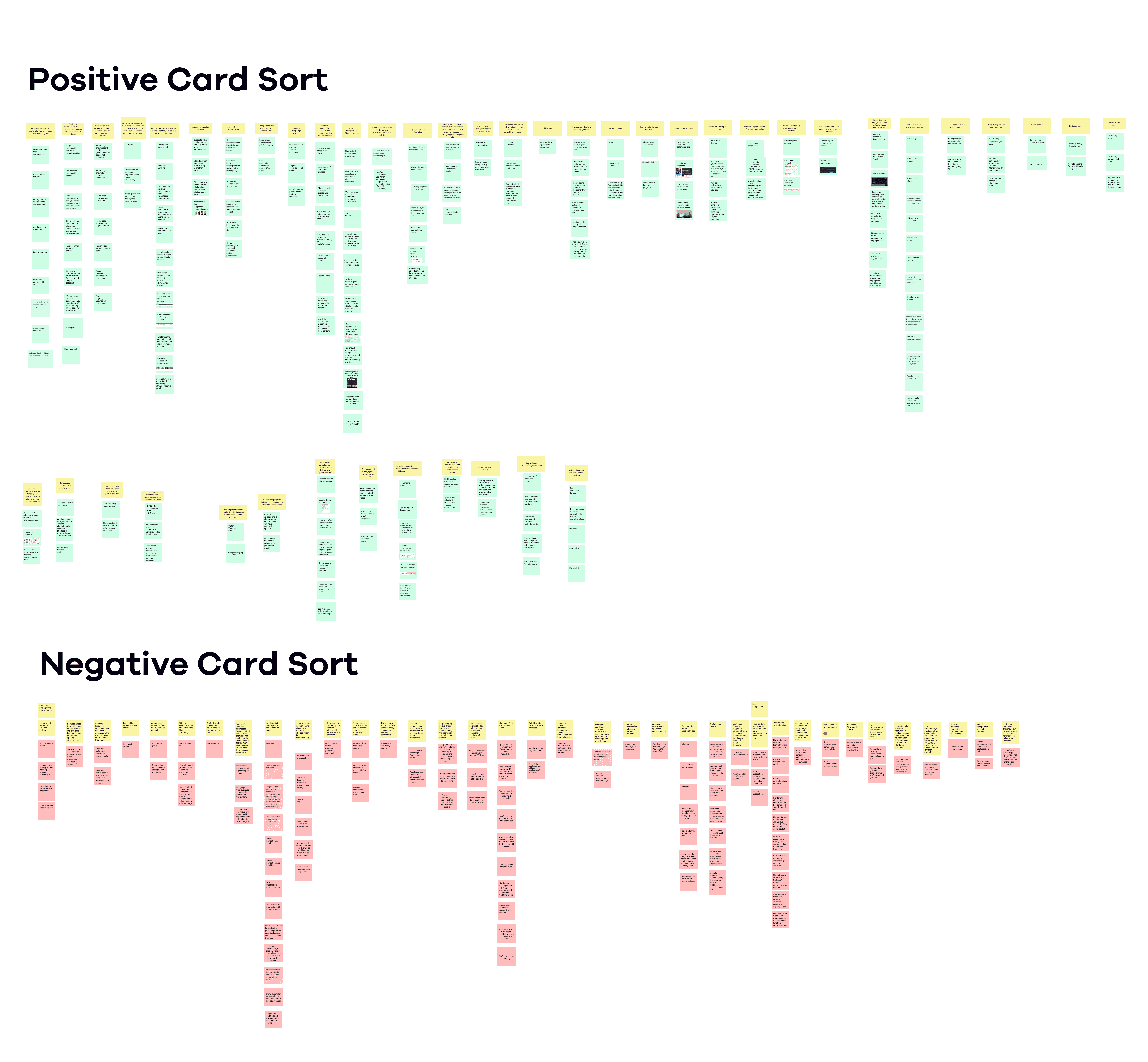
Card sorting: Categorizing solutions from competitive analysis
Insights obtained from feature comparison were sorted out into categories to see potential ideas we could work on further and avoid the drawback in those designs.
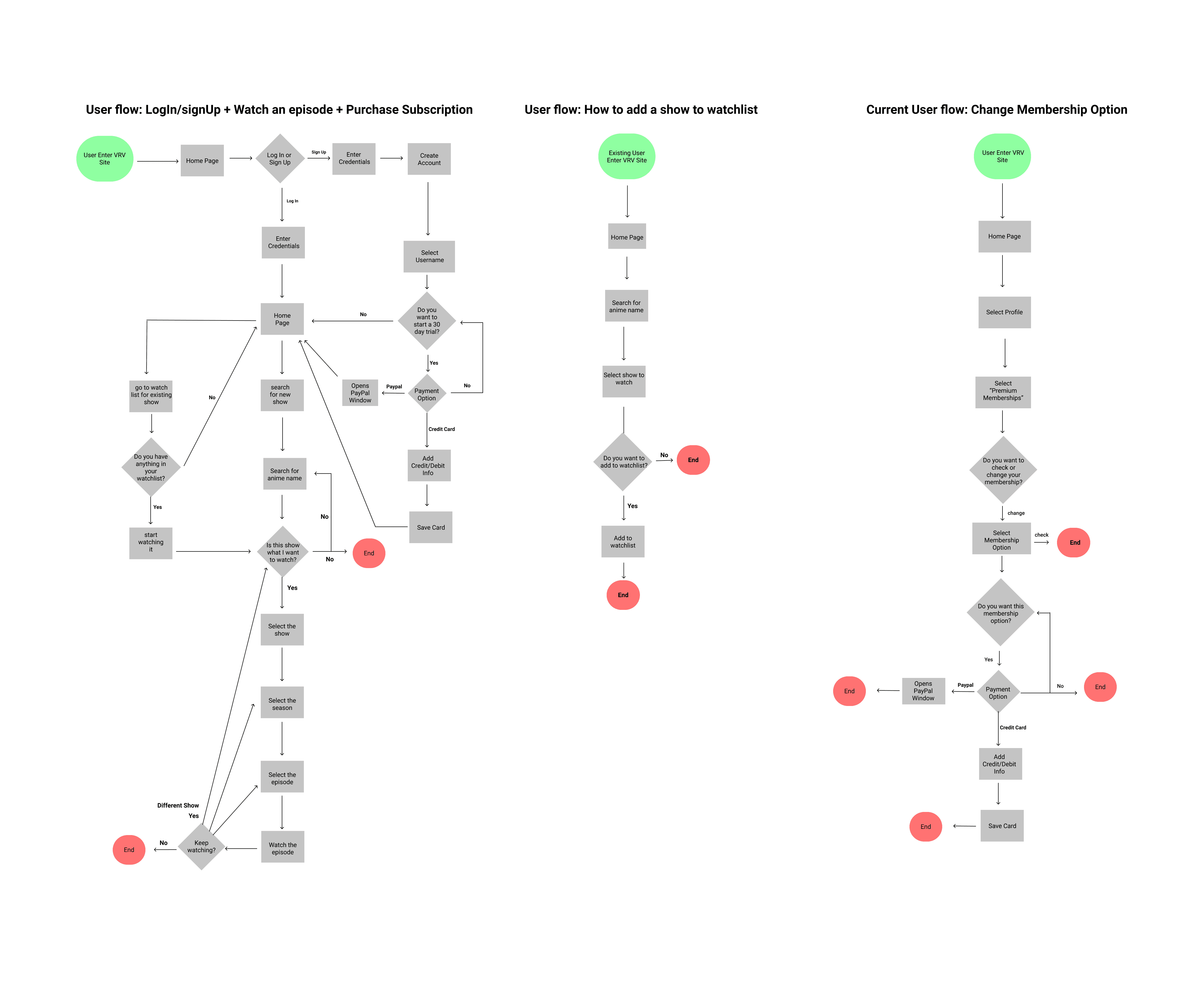
User flows: improved and simplified ways to complete tasks
User flows were simplified and made intuitive for a smoother user experience. It also gave us a deeper understanding of the steps users will be going through and the problems they might encounter in the flow.
Brainstorming some low-fidelity solutions
Ideation
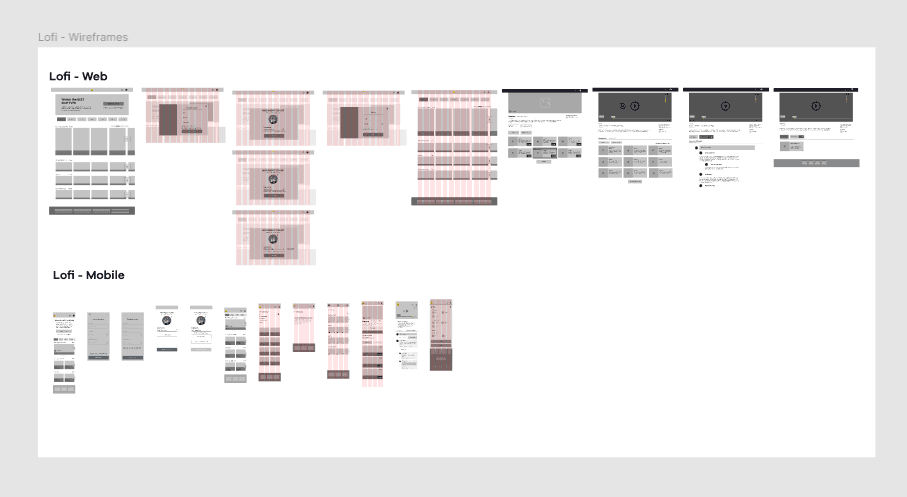
After defining problems and getting perspective on how competitors are tackling those problem, we started sketching out some low fidelity solutions for web and mobile to get everyone’s opinion on so we can move forward with the best possible solution
Creating Uniformity Across the Team
Design Systems
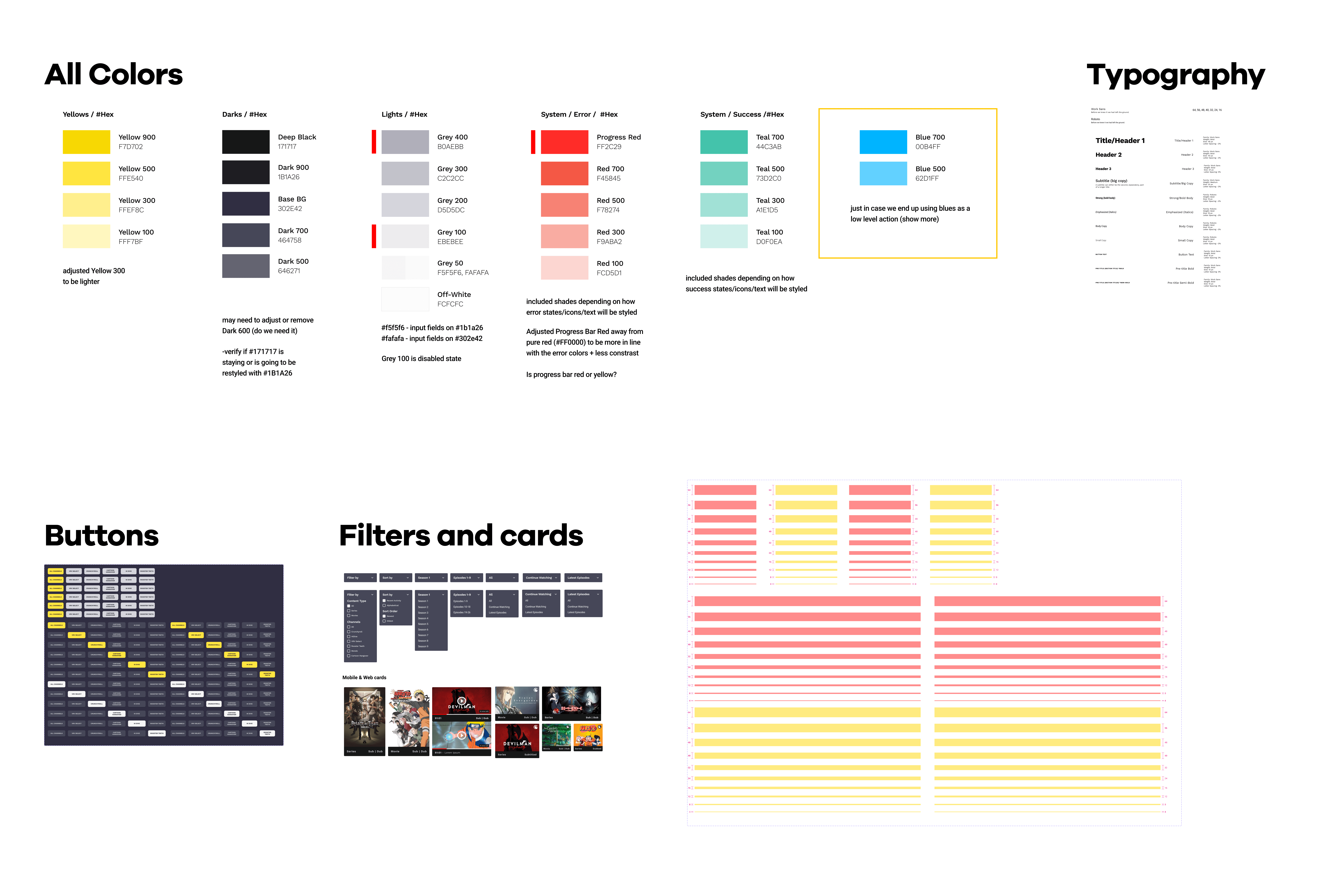
I used atomic deign method to create a design system with my team. This helped us create style guides and pattern libraries to use across team to keep the design consisten across all screens and platforms.
Time to put research into visualization and test ideas
The Solution
The high-fidelity prototype was created to test different scenarios for usability and accessibility of the design solution.
Applying Search Filter
Categories with horizontal scrolling were created for similar content to minimize scrolling. Advance filtering and search features were added to improve content discoverabiiity.
Saving and Watching Shows
Clear CTA’s were added for important functions. Episodes were displayed in clear hierarchy to help make a decision along with other important information.
Multiple subscription options
Users were provided with multiple subscription options for their favourite channels, all in one place, to make it easier for them to decide which plan is suitable for them.
Evaluating high-fidelity Prototype
Moderated Usibility Testing
The prototype was tested by 10 users in two phases, including with people having disabilities like color blindness, cognitive issues due to aging. Four scenarios were tested with them based on the user flows we improved.
96% success Rate!
Some quotes from the users:
“Everything seemed to be where I would’ve anticipated it...didn’t even have to think about it.”
“Everything that needed to be above the fold was above the fold, didn’t need to do scrolling or anything."
“Feels exactly like it should”
1- Simplicity is Strength
As a designer, we are often lured by attractive, trendy and out of the box designs. But, We must always remember the ‘why’. The primary goal is to understand the user, their problems and then come up with a design that solves it.
2- Prioritise
Create a strategic plan to launch an MVP. This helps deal with out-of-scope requests that could potentially derail the project and helps deliver a quality product in time.
3. Seek out feedback early and continually
The trouble with most of us is that we would rather be ruined by praise than saved by criticism. Keeping the stakeholders/users in loop and testing solutions in whatever form (paper, low-fi or hi-fi) as early as possible saves ample amount of time and re-work.
Perfect Learnings
VRV - Streaming website with anime channel subscriptions
Brief
Brief
VRV is an over-the-top streaming service launched in November 2016. Some of VRV's content can be streamed for free, while other content requires a subscription. The subscriptions to its channels can be purchased individually, or in a premium bundle.
VRV is currently available only in the United States, despite some of its partnered content being available for viewing worldwide outside the platform. In 2020, I joined 6 other UX Designers, to redesign the current VRV platform to improve usability and discoverability of content as well as increasing and retaining the number of paid subscribers.
How might we increase the number of subscribed users by improving content discoverability and layout consistency without content overload?
Challenge
Challenge
User Interviews : Qualitative Research
16 people of different age group were interviewed to understand their behavioural pattern while using VRV vs. other platforms paid subscribers.
Research
Research
My Research Encompassed
How often they are using these streaming services?
Their motivations behind using certain platform?
What challenges did they face while completing certain tasks?
How do they complete assigned task on VRV?
User Insights
None of the users like to use mobile web due to inconsistent and irresponsive design.
Almost every user preferred search bars to find shows due quick and easy access.
Current catagorical structure in VRV didn’t seem to help any user in providing what they were looking for.
Information architecture and navigation seem redundant in VRV as most users were stuck
while completing the assigned task.
Surveys : Quantitative Research
Only 2 out of 51 users, involved in quantitative research, were using and familiar with VRV. But more than half of the users were watching anime on regular basis using other streaming services.
Red Routes - Prioritising user needs
We narrowed down our focus on solving the problems which were causing hindrance in fulfilling their primary needs. We categorized their needs accordingly based on how often and how many users they faced.
Competitive analysis to explore already available solutions
12 direct and indirect competitors were analyzed to understand how they were approaching their users needs and where they were lacking. This helped us narrowed down our focus to ideas that potentially seem more promising.
Card sorting: Categorizing solutions from competitive analysis
Insights obtained from feature comparison were sorted out into categories to see potential ideas we could work on further and avoid the drawback in those designs.
User flows: improved and simplified ways to complete tasks
User flows were simplified and made intuitive for a smoother user experience. It also gave us a deeper understanding of the steps users will be going through and the problems they might encounter in the flow.
Brainstorming some low-fidelity solutions
Ideation
Ideation
After defining problems and getting perspective on how competitors are tackling those problem, we started sketching out some low fidelity solutions for web and mobile to get everyone’s opinion on so we can move forward with the best possible solution
Creating Uniformity Across the Team
Design System
Design System
I used atomic deign method to create a design system with my team. This helped us create style guides and pattern libraries to use across team to keep the design consisten across all screens and platforms.
Time to put research into visualization and test ideas
The Solution
The Solution
The high-fidelity prototype was created to test different scenarios for usability and accessibility of the design solution.
Applying Search Filter
Categories with horizontal scrolling were created for similar content to minimize scrolling. Advance filtering and search features were added to improve content discoverabiiity.
Saving and Watching Shows
Clear CTA’s were added for important functions. Episodes were displayed in clear hierarchy to help make a decision along with other important information.
Multiple subscription options
Users were provided with multiple subscription options for their favourite channels, all in one place, to make it easier for them to decide which plan is suitable for them.
Evaluating high-fidelity Prototype
Moderated Usibility Testing
Moderated Usibility Testing
The prototype was tested by 10 users in two phases, including with people having disabilities like color blindness, cognitive issues due to aging. Four scenarios were tested with them based on the user flows we improved.
96% success Rate!
Some quotes from the users:
“Everything seemed to be where I would’ve anticipated it...didn’t even have to think about it.”
“Everything that needed to be above the fold was above the fold, didn’t need to do scrolling or anything."
“Feels exactly like it should”
1- Simplicity is Strength
As a designer, we are often lured by attractive, trendy and out of the box designs. But, We must always remember the ‘why’. The primary goal is to understand the user, their problems and then come up with a design that solves it.
2- Prioritise
Create a strategic plan to launch an MVP. This helps deal with out-of-scope requests that could potentially derail the project and helps deliver a quality product in time.
3. Seek out feedback early and continually
The trouble with most of us is that we would rather be ruined by praise than saved by criticism. Keeping the stakeholders/users in loop and testing solutions in whatever form (paper, low-fi or hi-fi) as early as possible saves ample amount of time and re-work.
Perfect Learnings
Perfect Learnings
Brief
VRV - Streaming website with anime channel subscriptions
VRV is an over-the-top streaming service launched in November 2016. Some of VRV's content can be streamed for free, while other content requires a subscription. The subscriptions to its channels can be purchased individually, or in a premium bundle.
VRV is currently available only in the United States, despite some of its partnered content being available for viewing worldwide outside the platform. In 2020, I joined 6 other UX Designers, to redesign the current VRV platform to improve usability and discoverability of content as well as increasing and retaining the number of paid subscribers.
Challenge
How might we increase the number of subscribed users by improving content discoverability and layout consistency without content overload?
Research
User Interviews : Qualitative Research
16 people of different age group were interviewed to understand their behavioural pattern while using VRV vs. other platforms paid subscribers.
My Research Encompassed
How often they are using these streaming services?
Their motivations behind using certain platform?
What challenges did they face while completing certain tasks?
How do they complete assigned task on VRV?
User Insights
None of the users like to use mobile web due to inconsistent and irresponsive design.
Almost every user preferred search bars to find shows due quick and easy access.
Current catagorical structure in VRV didn’t seem to help any user in providing what they were looking for.
Information architecture and navigation seem redundant in VRV as most users were stuck
while completing the assigned task.
Surveys : Quantitative Research
Only 2 out of 51 users, involved in quantitative research, were using and familiar with VRV. But more than half of the users were watching anime on regular basis using other streaming services.
Red Routes - Prioritising user needs
We narrowed down our focus on solving the problems which were causing hindrance in fulfilling their primary needs. We categorized their needs accordingly based on how often and how many users they faced.
Competitive analysis to explore already available solutions
12 direct and indirect competitors were analyzed to understand how they were approaching their users needs and where they were lacking. This helped us narrowed down our focus to ideas that potentially seem more promising.
Card sorting: Categorizing solutions from competitive analysis
Insights obtained from feature comparison were sorted out into categories to see potential ideas we could work on further and avoid the drawback in those designs.
User flows: improved and simplified ways to complete tasks
User flows were simplified and made intuitive for a smoother user experience. It also gave us a deeper understanding of the steps users will be going through and the problems they might encounter in the flow.
Ideation
Brainstorming some low-fidelity solutions
After defining problems and getting perspective on how competitors are tackling those problem, we started sketching out some low fidelity solutions for web and mobile to get everyone’s opinion on so we can move forward with the best possible solution
Design System
Creating Uniformity Across the Team
I used atomic deign method to create a design system with my team. This helped us create style guides and pattern libraries to use across team to keep the design consisten across all screens and platforms.
The Solution
Time to put research into visualization and test ideas
The high-fidelity prototype was created to test different scenarios for usability and accessibility of the design solution.
Applying Search Filter
Categories with horizontal scrolling were created for similar content to minimize scrolling. Advance filtering and search features were added to improve content discoverabiiity.
Saving and Watching Shows
Clear CTA’s were added for important functions. Episodes were displayed in clear hierarchy to help make a decision along with other important information.
Multiple subscription options
Users were provided with multiple subscription options for their favourite channels, all in one place, to make it easier for them to decide which plan is suitable for them.
Moderated Usibility Testing
Evaluating high-fidelity Prototype
The prototype was tested by 10 users in two phases, including with people having disabilities like color blindness, cognitive issues due to aging. Four scenarios were tested with them based on the user flows we improved.
96% success Rate!
Some quotes from the users:
“Everything seemed to be where I would’ve anticipated it...didn’t even have to think about it.”
“Everything that needed to be above the fold was above the fold, didn’t need to do scrolling or anything."
“Feels exactly like it should”
Perfect Learnings
1- Simplicity is Strength
As a designer, we are often lured by attractive, trendy and out of the box designs. But, We must always remember the ‘why’. The primary goal is to understand the user, their problems and then come up with a design that solves it.
2- Prioritise
Create a strategic plan to launch an MVP. This helps deal with out-of-scope requests that could potentially derail the project and helps deliver a quality product in time.
3. Seek out feedback early and continually
The trouble with most of us is that we would rather be ruined by praise than saved by criticism. Keeping the stakeholders/users in loop and testing solutions in whatever form (paper, low-fi or hi-fi) as early as possible saves ample amount of time and re-work.
Designed with
by Aqsa S
© 2025 – Aqsa S
Designed with
by Aqsa S
© 2025 – Aqsa S
Designed with
by Aqsa S
© 2025 – Aqsa S
Designed with
by Aqsa S
© 2025 – Aqsa S
Designed with
by Aqsa S
© 2025 – Aqsa S